


WordPress REST API Projects: 5 Killer Real-World Ideas
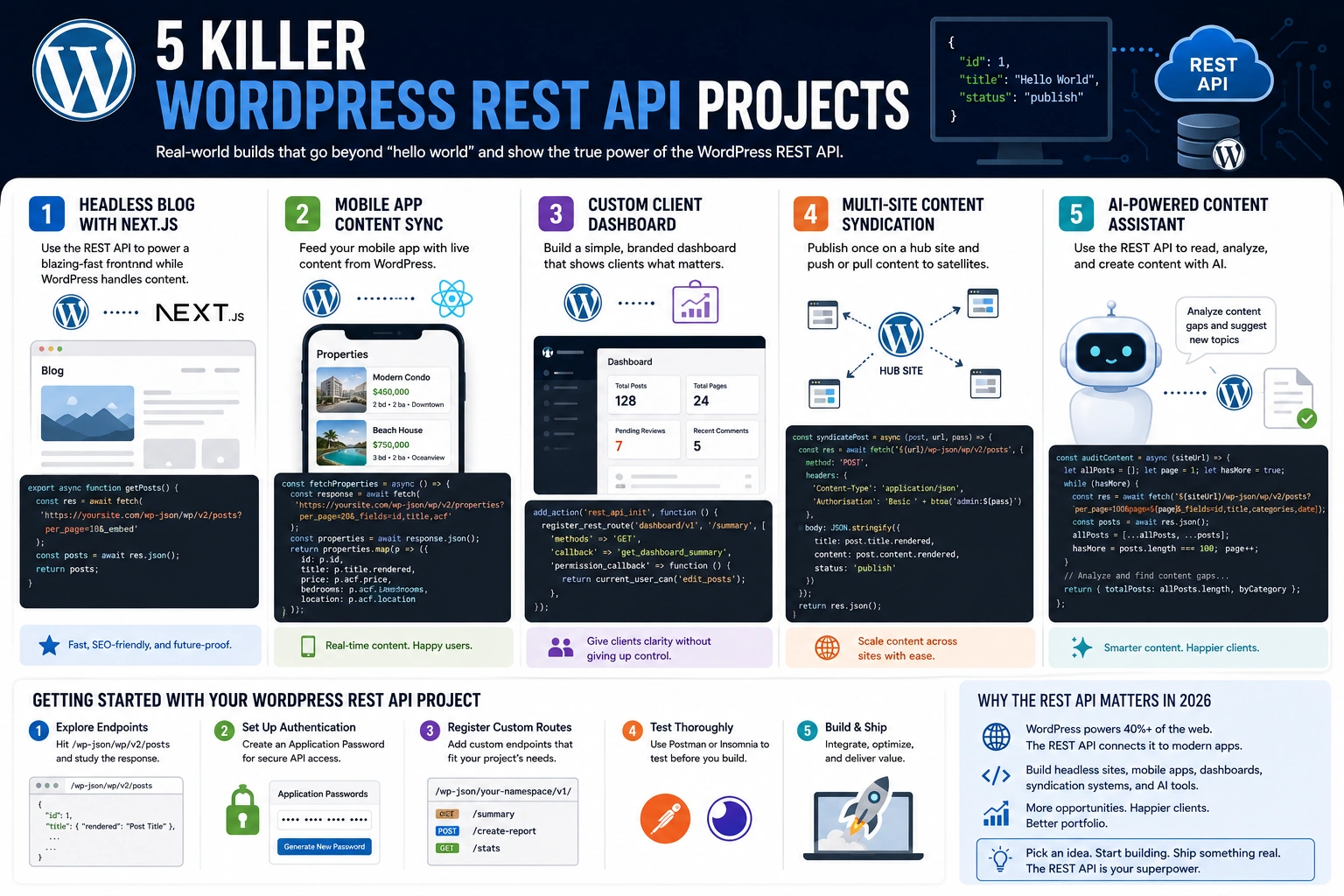
You’ve read the docs, hit a few endpoints, and fetched some posts in JSON. Now what? The WordPress REST API is one of the most powerful tools in the WordPress ecosystem, but most developers barely scratch the surface. If you’re looking for wordpress rest api projects that go beyond “hello world,” you’re in the right place. These five killer ideas will stretch your skills, impress clients, and open doors to builds you didn’t think WordPress could handle.
I’ve built several of these myself for client projects, and every single one started the same way — someone said, “Can WordPress do that?” Spoiler: yes, it can. Here are five real-world WordPress REST API projects you can start building today.
Table of Contents
1. Build a Headless Blog With the WordPress REST API and Next.js
Headless WordPress is no longer a buzzword — it’s a production-ready architecture that separates your content backend from your frontend. The WordPress REST API makes this possible by exposing every post, page, category, and custom field as a clean JSON endpoint.
The idea is simple: keep WordPress as your content management system while building the public-facing site in a modern JavaScript framework like Next.js, Astro, or SvelteKit. Your editors get the familiar WordPress admin. Your visitors get a blazing-fast frontend.
Here’s a basic fetch to pull your latest posts into a Next.js app:
// lib/api.js
export async function getPosts() {
  const res = await fetch(
    'https://yoursite.com/wp-json/wp/v2/posts?per_page=10&_embed'
  );
  const posts = await res.json();
  return posts;
}
The _embed parameter is the real trick — it inlines featured images, author data, and taxonomy terms in a single request, eliminating the need for multiple API calls. If you’ve already covered the fundamentals in our beginner’s guide to the WordPress REST API, this project is the logical next step.
For hosting a headless WordPress backend, you’ll want a provider that handles the API traffic well. A managed host like Kinsta is worth considering since it’s optimized for WordPress API performance and can handle the request volume a decoupled setup generates.
2. WordPress REST API Mobile App Content Sync
Every business wants a mobile app, and most of them already have a WordPress site full of content. Instead of rebuilding everything from scratch, use the WordPress REST API to feed your app content directly from your existing site.
This works brilliantly for news outlets, membership sites, restaurants with rotating menus, and real estate companies with property listings. Your client updates a post in WordPress, and the app reflects the change in real time — no app store update required.
A React Native implementation looks something like this:
// Fetch posts with custom fields for a real estate app
const fetchProperties = async () => {
  const response = await fetch(
    'https://yoursite.com/wp-json/wp/v2/properties?per_page=20&_fields=id,title,acf'
  );
  const properties = await response.json();
  return properties.map(p => ({
    id: p.id,
    title: p.title.rendered,
    price: p.acf.price,
    bedrooms: p.acf.bedrooms,
    location: p.acf.location
  }));
};
The _fields parameter is essential here — it limits the response to only the data you need, reducing payload size and speeding up your app. Combine this with custom post types and Advanced Custom Fields, and you’ve got a flexible content backend for virtually any mobile application.
3. Custom Client Dashboard Using the WordPress REST API
Not every client needs to see the full WordPress admin. Some just want a simple dashboard showing their site stats, recent form submissions, latest orders, or pending content approvals. The WordPress REST API lets you build exactly that — a custom, branded interface that pulls data from WordPress without exposing the backend.
I’ve built these for clients who manage WooCommerce stores and wanted a single screen showing today’s orders, revenue, and low-stock products. Instead of teaching them to navigate the WooCommerce admin, I gave them a React dashboard that hit a handful of wordpress rest api endpoints and displayed exactly what they needed.
You can register custom REST routes in your theme or plugin to aggregate this data:
// functions.php — Register a custom dashboard endpoint
add_action('rest_api_init', function () {
  register_rest_route('dashboard/v1', '/summary', [
    'methods'  => 'GET',
    'callback' => 'get_dashboard_summary',
    'permission_callback' => function () {
      return current_user_can('edit_posts');
    },
  ]);
});

function get_dashboard_summary() {
  return [
    'total_posts'    => wp_count_posts()->publish,
    'total_pages'    => wp_count_posts('page')->publish,
    'recent_comments'=> get_comments(['number' => 5]),
    'pending_reviews' => wp_count_posts()->pending,
  ];
}
This approach is a genuine value-add for freelance developers. You can charge a premium for a branded client portal, and the WordPress REST API makes the implementation surprisingly lean. The official REST API Handbook covers the full route registration process if you want to dive deeper.
4. Multi-Site Content Syndication With the WordPress REST API
If you manage multiple WordPress sites — or your client does — content syndication is a game-changer. The concept: publish once on a central “hub” site, then automatically push that content to satellite sites via the REST API.
This is common for franchise businesses, media networks, and agencies that manage a portfolio of niche sites. A parent company publishes a press release or product update, and every regional site picks it up automatically.
The syndication flow works in two directions. You can pull content from a hub site into satellite sites using GET requests, or push from the hub to satellites using authenticated POST requests. Here’s a simplified push example:
// Push a post from hub to satellite site
const syndicatePost = async (post, satelliteUrl, appPassword) => {
  const response = await fetch(`${satelliteUrl}/wp-json/wp/v2/posts`, {
    method: 'POST',
    headers: {
      'Content-Type': 'application/json',
      'Authorization': 'Basic ' + btoa(`admin:${appPassword}`)
    },
    body: JSON.stringify({
      title: post.title.rendered,
      content: post.content.rendered,
      status: 'publish'
    })
  });
  return response.json();
};
Application Passwords (built into WordPress core since version 5.6) make authentication simple and secure. For more complex setups, consider building a WordPress plugin that hooks into publish_post and triggers syndication automatically whenever new content goes live.
5. AI-Powered Content Assistant via the WordPress REST API
This is the 2026 project that will set you apart. AI agents and MCP (Model Context Protocol) servers that interact with WordPress through the REST API are becoming increasingly common. The REST API endpoint reference is well-documented enough that AI tools can reason about it, which means you can build intelligent content assistants that read, create, and manage WordPress content programmatically.
Picture this: a content assistant that analyzes your existing posts via the WordPress REST API, identifies content gaps, generates draft outlines, and creates new posts — all without your client opening the WordPress admin. The AI reads published content through GET requests and creates drafts through authenticated POST requests.
A practical starting point is a script that audits your existing content:
// Fetch all posts and analyze content gaps
const auditContent = async (siteUrl) => {
  let allPosts = [];
  let page = 1;
  let hasMore = true;

  while (hasMore) {
    const res = await fetch(
      `${siteUrl}/wp-json/wp/v2/posts?per_page=100&page=${page}&_fields=id,title,categories,date`
    );
    const posts = await res.json();
    allPosts = [...allPosts, ...posts];
    hasMore = posts.length === 100;
    page++;
  }

  // Group by category to find gaps
  const byCategory = allPosts.reduce((acc, post) => {
    post.categories.forEach(cat => {
      acc[cat] = (acc[cat] || 0) + 1;
    });
    return acc;
  }, {});

  return { totalPosts: allPosts.length, byCategory };
};
From there, you can layer in an AI model to suggest topics based on what’s missing, generate SEO-optimized drafts, and push them to WordPress as pending reviews. This is where the WordPress REST API meets the future of content management, and clients will pay a premium for this kind of automation.
Getting Started With Your WordPress REST API Project
Before you dive into any of these builds, make sure you’ve got the fundamentals locked down. Every WordPress REST API project starts with the same foundation: understanding authentication, routes, endpoints, and how WordPress structures its JSON responses.
Here’s my recommended approach for getting started:
Start with read-only endpoints. Hit /wp-json/wp/v2/posts on your local site and study the response structure. Understand how _embed, _fields, and pagination parameters work before moving to authenticated write operations.
Set up Application Passwords. Go to your WordPress user profile, generate an application password, and test a simple POST request. This is how you’ll handle authentication for any project that creates or updates content.
Register custom endpoints early. As shown in the dashboard example, custom routes let you shape the API to fit your project’s exact needs. Don’t try to force default endpoints into use cases they weren’t designed for.
Use a tool like Postman or Insomnia to test your endpoints before writing frontend code. According to Jetpack’s REST API guide, testing endpoints independently is one of the most effective ways to debug issues before they compound in your application layer.
Why the WordPress REST API Is Worth Mastering in 2026
WordPress powers over 40% of the web, and the REST API is the bridge between that massive content ecosystem and modern application development. Whether you’re building headless frontends, mobile apps, client dashboards, content syndication systems, or AI-powered tools, the WordPress REST API is the common thread.
These five project ideas aren’t theoretical exercises. They’re real services you can offer to clients, add to your portfolio, or use to level up your own sites. The developers who thrive in 2026 are the ones treating WordPress as a powerful API-first platform — not just a blogging tool.
Ready to build your first WordPress REST API project? Start with whichever idea excites you most, dig into the official REST API Handbook, and start shipping. If you want the foundational knowledge first, check out our beginner’s guide to the WordPress REST API to make sure your fundamentals are solid before tackling these advanced builds.