


Schema Markup for Small Business: Essential Guide to Stunning Rich Results
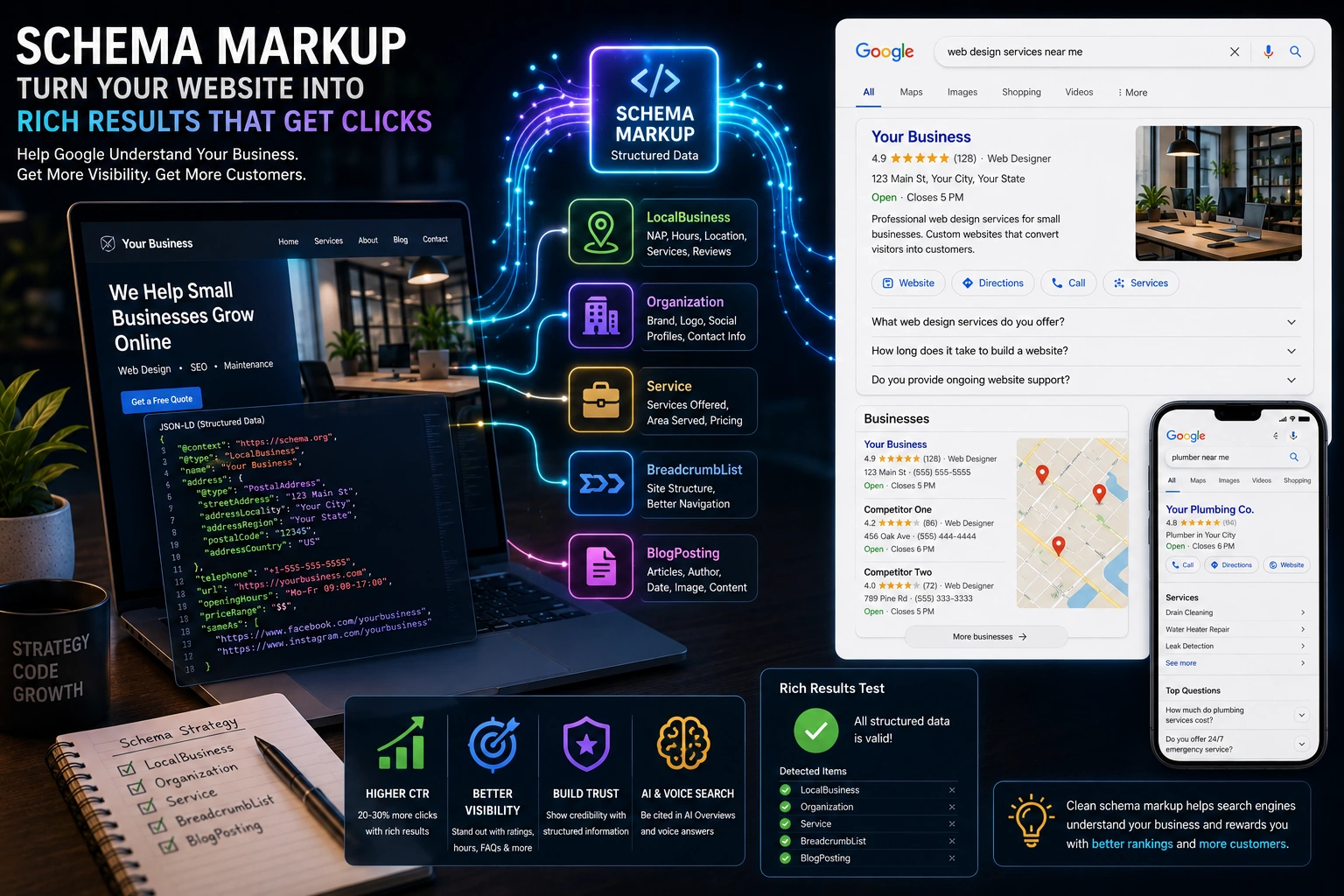
Table of Contents
If your schema markup small business strategy is nonexistent, you’re leaving visibility on the table — and handing it to your competitors. Structured data is the behind-the-scenes code that tells Google exactly what your business does, where you’re located, and what services you offer. When implemented correctly, it unlocks rich results — those eye-catching search listings with star ratings, business hours, FAQs, and more that dominate the first page.
I’ve seen small business websites jump from invisible to unmissable after adding just a few schema types. In this guide, I’ll walk you through exactly which schema markup types matter most, how to implement them, and how to test everything so Google rewards your effort with better on-page SEO performance.
What Is Schema Markup and Why Does It Matter for Small Business SEO?
Schema markup is a standardized vocabulary of code (defined at Schema.org) that you add to your website’s HTML to help search engines understand your content at a deeper level. Instead of just reading your text, Google can parse structured data to identify specific entities — your business name, address, phone number, services, reviews, and more.
For small businesses, this matters enormously. According to multiple SEO studies, websites with properly implemented structured data see 20-30% higher click-through rates compared to standard listings. That’s because schema markup qualifies your pages for rich results — enhanced search listings that stand out visually and earn more clicks.
In 2026, schema markup is more critical than ever. AI-powered search engines like Google’s AI Overviews, ChatGPT, and Perplexity increasingly rely on structured data to source information for their answers. If your site has clean, accurate schema, you’re far more likely to be cited in AI-generated responses — a new frontier of visibility that most small businesses haven’t tapped into yet.
Essential Schema Markup Types Every Small Business Should Use
You don’t need to implement every schema type on Schema.org — far from it. Here are the five types that deliver the biggest impact for schema markup small business websites.
LocalBusiness Schema
If you operate a brick-and-mortar business or serve a specific geographic area, LocalBusiness schema is non-negotiable. This tells Google your business name, address, phone number (NAP), hours of operation, geographic coordinates, price range, and service area.
When implemented correctly, LocalBusiness schema can enhance your Google Business Profile listing and help you appear in local pack results — the map-based listings that appear at the top of local searches. Use the most specific subtype available: if you’re a restaurant, use Restaurant; if you’re a dentist, use Dentist. Google rewards specificity.
Organization Schema
Organization schema establishes your brand identity in Google’s Knowledge Graph. It includes your company name, logo, social media profiles, contact information, and founding details. Even if you already have LocalBusiness schema, adding Organization schema reinforces your brand’s entity signals — which helps Google connect all your online properties together.
This is especially valuable for building brand authority in AI search results, where entity recognition determines which businesses get cited.
Service Schema
For service-based businesses — web developers, plumbers, consultants, agencies — Service schema is a game-changer. It lets you define each service you offer with its own structured data, including the service name, description, provider, area served, and pricing information.
Add Service schema to each of your service pages. This helps Google understand the full scope of what you do, and it can trigger service-specific rich results that match high-intent searches like “WordPress developer near me” or “local SEO consultant.”
BreadcrumbList Schema
BreadcrumbList schema creates a navigational trail in search results showing users exactly where a page sits within your site hierarchy — for example, Home > Services > WordPress Development. This improves user experience in search results and helps Google understand your site structure.
Most WordPress themes and SEO plugins (like RankMath) generate BreadcrumbList schema automatically, but it’s worth verifying that it’s working correctly.
Article and BlogPosting Schema
If you publish blog content (and you should), Article or BlogPosting schema helps Google identify the headline, author, publish date, featured image, and description of each post. This qualifies your articles for article-specific rich results and improves how your content appears in Google News and Discover.
For small businesses using content marketing, this schema type ensures your blog posts get maximum visibility for the effort you put into writing them.
How to Add Schema Markup to Your Small Business Website
The good news: you don’t need to be a developer to implement schema markup for your small business site. Here’s the practical approach.
Use JSON-LD format. Google explicitly recommends JSON-LD because it sits cleanly in your page’s <head> section without interfering with visible content. It’s easier to maintain and debug than Microdata or RDFa alternatives.
Leverage your SEO plugin. If you’re on WordPress with RankMath or Yoast SEO, you already have built-in schema support. RankMath automatically adds Article schema to posts, Organization schema sitewide, and lets you configure LocalBusiness schema in its setup wizard. You can also customize schema per page using the Schema tab in the post editor.
Add custom schema manually when needed. For Service schema or more advanced implementations, you can add JSON-LD blocks directly to your page templates or use a plugin like Schema Pro. Here’s a simplified example of what LocalBusiness JSON-LD looks like:
{
  "@context": "https://schema.org",
  "@type": "LocalBusiness",
  "name": "Your Business Name",
  "address": {
    "@type": "PostalAddress",
    "streetAddress": "123 Main St",
    "addressLocality": "Your City",
    "addressRegion": "Your State",
    "postalCode": "12345"
  },
  "telephone": "+1-555-555-5555",
  "openingHours": "Mo-Fr 09:00-17:00",
  "url": "https://yourbusiness.com"
}
Place this in the <head> of your homepage (wrapped in <script type="application/ld+json"> tags), and Google will start reading it on the next crawl.
Testing Your Schema Markup for Stunning Rich Results
Implementing schema is only half the battle — you need to verify that Google can actually read and validate it. Here are the essential tools.
Google’s Rich Results Test is the gold standard. Paste any URL and it will show you exactly which rich result types are detected, flag errors that prevent rich results, and highlight warnings for optional improvements. Bookmark this — you’ll use it often.
Google Search Console’s Enhancements report shows you schema performance across your entire site over time. Once you’ve added structured data, submit your sitemap in Search Console to prompt Google to recrawl the updated pages, then monitor the Enhancements section for any issues that appear.
Fix all errors first — these block rich results entirely. Warnings are optional but worth addressing, as they can improve how your rich results appear.
Common Schema Markup Mistakes Small Businesses Make
After auditing dozens of small business sites, I see the same mistakes repeatedly. Avoid these to get the most from your schema markup small business implementation.
Using generic types instead of specific subtypes. Don’t use LocalBusiness when Dentist, Restaurant, or LegalService fits better. Google rewards precision.
Inconsistent NAP data. Your name, address, and phone number in schema must exactly match your Google Business Profile and every other online listing. Even small differences — “St” vs “Street” — can confuse Google’s entity matching.
Marking up content that doesn’t exist on the page. Google’s structured data guidelines are clear: your schema must reflect visible page content. Adding fake reviews, invisible services, or fabricated data violates their policies and can trigger a manual action penalty.
Ignoring schema after implementation. Schema isn’t a set-it-and-forget-it task. Update your structured data when business hours change, services are added or removed, or your address changes. Stale schema erodes trust with search engines.
Skipping validation. Always run your pages through the Rich Results Test after making changes. A missing bracket or misplaced comma in JSON-LD can silently break your entire schema.
Start Using Schema Markup for Your Small Business Today
Schema markup is one of the highest-impact, lowest-effort SEO wins available to small businesses in 2026. Most of your local competitors aren’t using it — or they’re using it incorrectly — which means proper implementation gives you an immediate advantage in search visibility.
Start with LocalBusiness and Organization schema on your homepage, add Service schema to your service pages, and verify everything with the Rich Results Test. Within weeks, you should start seeing enhanced search listings that drive more clicks, more calls, and more customers.
Need help implementing schema markup or want a full structured data audit for your website? Get in touch — I help small businesses build WordPress sites that don’t just look great, but dominate search results.