


Proven WooCommerce Checkout Optimization Tips for Shocking Sales
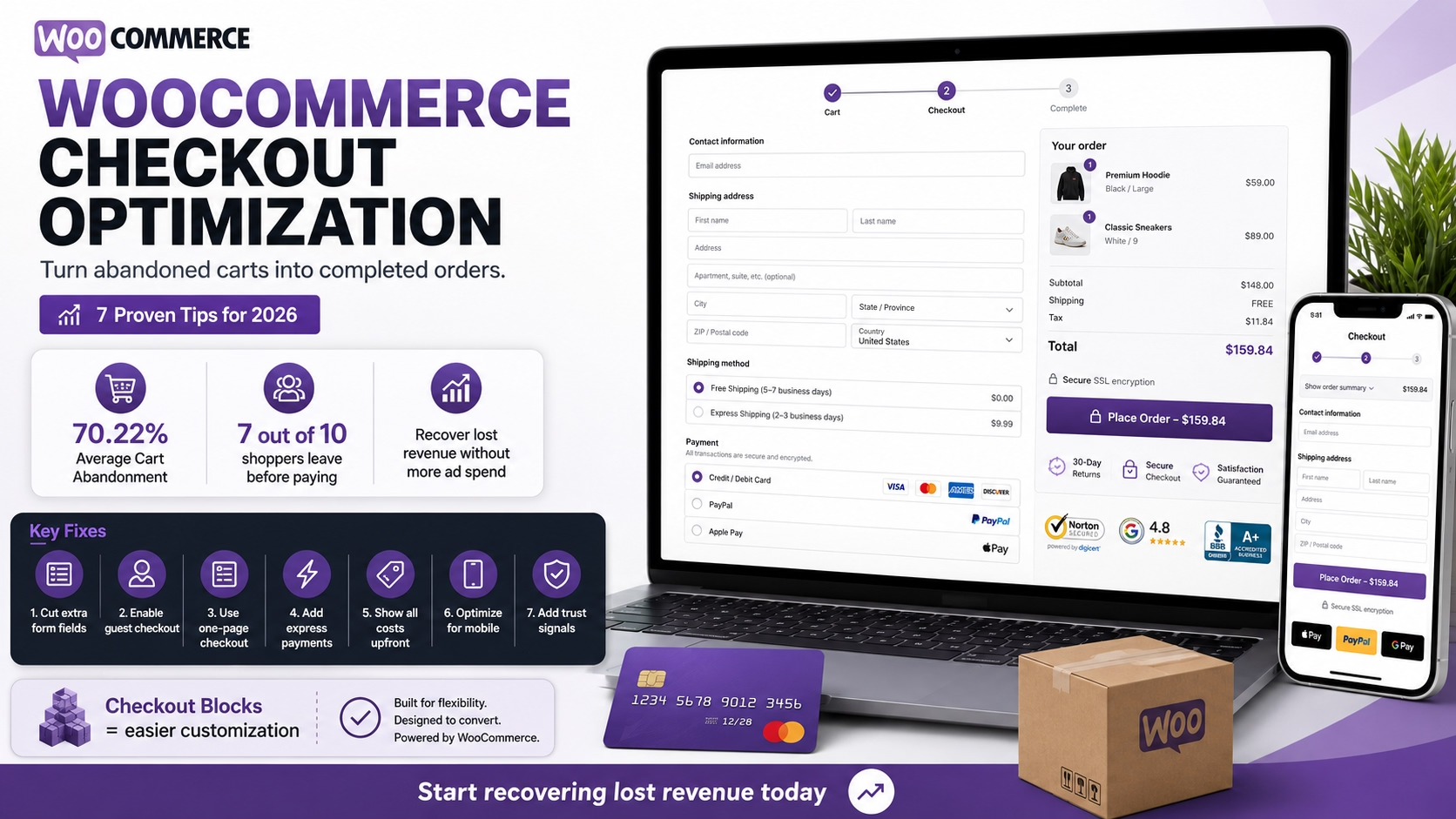
Table of Contents
Your store is driving traffic, products are landing in carts — and then nothing happens. If that sounds familiar, your checkout page is likely the problem. WooCommerce checkout optimization is the single most impactful change you can make to your online store in 2026, and most store owners are leaving shocking amounts of revenue on the table by ignoring it.
I’ve audited dozens of WooCommerce stores over the years, and the pattern is always the same: owners obsess over product pages and marketing funnels while their checkout bleeds money. In this guide, I’ll walk you through the proven tweaks that consistently turn abandoned carts into completed orders.
Why WooCommerce Checkout Optimization Matters in 2026
Here’s the uncomfortable truth: the average online shopping cart abandonment rate is 70.22%, according to Baymard Institute’s analysis of 50 different studies. That means roughly 7 out of every 10 shoppers who add a product to their cart walk away without paying.
For WooCommerce stores specifically, the default checkout experience hasn’t always been conversion-friendly. Too many form fields, mandatory account creation, limited payment options — these are fixable problems that cost real money. Baymard estimates that $260 billion in lost orders across the US and EU are recoverable through better checkout design alone.
If you’ve already invested in driving traffic through SEO, content marketing, or paid ads, optimizing your WooCommerce checkout is where you capture the return on that investment.
The Staggering Cost of Cart Abandonment
Let’s put this into perspective with real numbers. If your store generates $10,000/month in revenue with a 70% abandonment rate, even a modest 10% reduction in abandonment could add $3,000+ to your monthly bottom line — without spending a single dollar on additional traffic.
The top reasons shoppers abandon WooCommerce carts are entirely preventable. According to Baymard’s large-scale survey data, 39% leave because extra costs like shipping, tax, and fees weren’t disclosed upfront. Another 19% abandon because the site required them to create an account. 18% quit due to a checkout process that’s too long or complicated, and 10% leave because there aren’t enough payment methods available.
Every one of these issues has a straightforward WooCommerce checkout optimization fix. Let’s dig into them.
7 Proven WooCommerce Checkout Optimization Tips
1. Strip Your Checkout Form to the Essentials
The average ecommerce checkout contains over 23 form elements. Baymard’s research shows an ideal checkout flow needs only 12–14 elements — nearly half as many. Every unnecessary field is friction that pushes shoppers toward the exit.
In WooCommerce, go to Appearance → Editor (or use a checkout customizer plugin) and remove fields you don’t need. Company name, phone number, order notes — if they’re not essential for fulfillment, cut them. One clothing store that trimmed from 18 fields to 8 essential ones saw their conversion rate jump from 25% to 42% — a 68% improvement in just two weeks.
2. Enable Guest Checkout
Forcing account creation before purchase is the second-biggest conversion killer in ecommerce. Enable guest checkout under WooCommerce → Settings → Accounts & Privacy by checking “Allow customers to place orders without an account.” This single toggle can reduce cart abandonment by up to 20%.
You can always invite customers to create an account after they’ve paid, when they’re already committed. Many will happily sign up at that point to track their order.
3. Switch to a Single-Page Checkout
Multi-step checkouts create opportunities for drop-off at every transition. A single-page checkout — where cart summary, shipping, and payment are all visible on one screen — can improve conversions by 12–30% according to FunnelKit’s checkout optimization research.
You can achieve this using WooCommerce’s native checkout blocks or through extensions available on the WooCommerce Marketplace like WooCommerce One Page Checkout. Either approach eliminates unnecessary page loads and keeps shoppers focused on completing their order.
4. Add Express Payment Methods
In 2026, offering only credit card payments is a conversion liability. Stores with three or more payment methods see up to 30% higher conversion rates compared to those offering a single option. Add Apple Pay, Google Pay, and PayPal Express through the Stripe Payment Gateway — these let returning customers pay with a single tap, bypassing the entire form.
If you’re already running WooCommerce Subscriptions for recurring revenue, express payments are especially powerful for reducing friction on subscription sign-ups where the payment commitment feels larger.
5. Show All Costs Upfront
Hidden costs are the number-one reason for mid-checkout abandonment. Display shipping costs and estimated taxes on the product page or cart page — before a customer reaches checkout. Use WooCommerce’s built-in shipping calculator on the cart page, and consider offering free shipping thresholds (“Free shipping on orders over $75”) to eliminate cost surprises entirely.
Transparency isn’t just good for conversions — it builds the kind of trust that turns first-time buyers into repeat customers.
6. Optimize for Mobile-First Shopping
Mobile cart abandonment rates hit a staggering 80% compared to 66% on desktop. Your WooCommerce checkout must be thumb-friendly: large tap targets, autofill-enabled fields, minimal scrolling, and a streamlined layout that doesn’t force pinch-to-zoom.
Test your checkout on an actual phone — not just a browser’s responsive mode — and fix every friction point you discover. Address autocomplete is a quick win here. When customers start typing, autocomplete suggests the full address, which is faster, reduces errors, and dramatically improves the mobile checkout experience.
7. Build Trust Near the Payment Button
The moment a customer reaches the payment section is the moment doubt peaks. Place trust signals — SSL badges, money-back guarantees, accepted payment icons, and a clear return policy link — directly adjacent to the “Place Order” button. This visual reassurance addresses the 19% of shoppers who abandon specifically because they don’t trust the site with their credit card information.
A short line like “Your payment is encrypted and secure” next to a padlock icon costs nothing to implement and pays for itself instantly.
Use WooCommerce Checkout Blocks for Easy Customization
WooCommerce has shifted to a block-based checkout experience built on the Gutenberg editor, and it’s a game-changer for WooCommerce checkout optimization. The block checkout lets you visually rearrange, hide, or customize checkout elements without touching a single line of code.
Key advantages include instant field validation (errors show immediately instead of after form submission), built-in local pickup support that automatically removes unnecessary shipping fields, and native express payment buttons for Apple Pay and Google Pay. If you’re still running the legacy shortcode-based checkout, migrating to checkout blocks is one of the highest-impact changes you can make this year.
The block editor also integrates tightly with your theme’s styling, so your checkout page looks consistent with the rest of your store — a subtle detail that builds the visual trust driving conversions.
Start Recovering Lost Revenue Today
WooCommerce checkout optimization isn’t a one-time project — it’s an ongoing process of testing and refining. But the seven changes above are the highest-leverage starting points that I’ve seen deliver results repeatedly across dozens of client stores.
Start with the quick wins: enable guest checkout, cut unnecessary form fields, and show costs upfront. Then move to the bigger structural changes like single-page checkout and express payments. Every percentage point you recover from cart abandonment drops directly to your bottom line — no extra ad spend required.
Ready to transform your WooCommerce checkout into a conversion machine? I build high-performing ecommerce experiences for businesses that are serious about growth. Get in touch and let’s make your checkout page your strongest revenue asset.